A local AI agent —
runs on your machine,
under your control
TARS is a local AI agent runtime that runs as a single Go binary on your machine. From the browser console you can directly inspect and control its work — agent runs, memory, scheduled jobs, Git changes, execution history.
An AI agent
that works on your machine
The name comes from the TARS in Interstellar — practical, direct, dependable when things get complicated. TARS aims for that.
Not an agent running somewhere in the cloud you can't see, but a local AI agent that runs on your machine and can be inspected and controlled directly. Most AI agent tools are CLI-first, or add a thin web UI on top. TARS is designed around the browser console: chat, sub-agents, scheduled jobs, memory review, Git changes, run flow, and pending approvals each get their own page.
Since the agent works with your files and tools, you should be able to see what it's doing and step in when needed — that's the starting premise. Extensions stay lean: skills load only when invoked; plugins and MCP servers are used only when explicitly allowed. The system prompt stays small, and the agent stays focused on the current task.
Where you watch
the agent work
Many local agent tools end at a CLI. TARS uses the browser console as its main interface. Open 127.0.0.1:43180/console and you get screens that actually let you inspect and control the agent — not just status pages.
Mission Control
The screen you land on. Pulse, Reflection, active plans, runtime runs, cron jobs, disk pressure, sessions, and recommended setup actions on one page — agent state and work in progress at a glance.
Chat
Where the work happens. Dock the panels you need — Sessions, Files, Config, Context, Prompt, Prior Context, Tasks, Git, Skills, Cron, Health. Branch a session at a specific message; the first turn recommends the model tier that fits.
Approvals
Risky cleanup plans wait here for your review before TARS applies them — file paths, size, and reason first, then Approve or Reject. Applied plans keep a result log, and the page also carries the sanitized Remote Execution view.
Logs
Tail the runtime log without leaving the browser. Pick the file, filter by level and component, choose how many lines, and expand any line to its raw JSON.
Pulse
The watchdog surface. Cron failures, stuck runs, disk pressure, Telegram delivery, and reflection health are checked every 60s; an LLM classifier sorts each tick into ignore / notify / autofix, and only whitelisted autofixes may act.
Settings
Quick Start checks only, by design: provider credentials, tier bindings, workspace path, and the switches that gate Pulse, Reflection, and Remote Access. Long-tail configuration lives in YAML, where it can be diffed and version-controlled.
Run the console as a desktop app
The browser console ships as an installable PWA. Add it to your Dock, taskbar, or launcher and open it in its own window — same surface as the browser, with deep-link shortcuts and an at-a-glance status pill in the topbar.
- Chrome / Edge / Brave / Arc: address bar install button
- Safari 14+: File → Add to Dock
- Right-click the Dock icon: Chat / Sessions / Ops / Pulse / Reflection shortcuts
- Topbar status pill: server · pulse · reflection · active sessions in one glance
The console,
as it actually ships
Captured from a running tars serve, built from an August 2026 snapshot of main — the five screens the sidebar leads to, in the order it lists them.
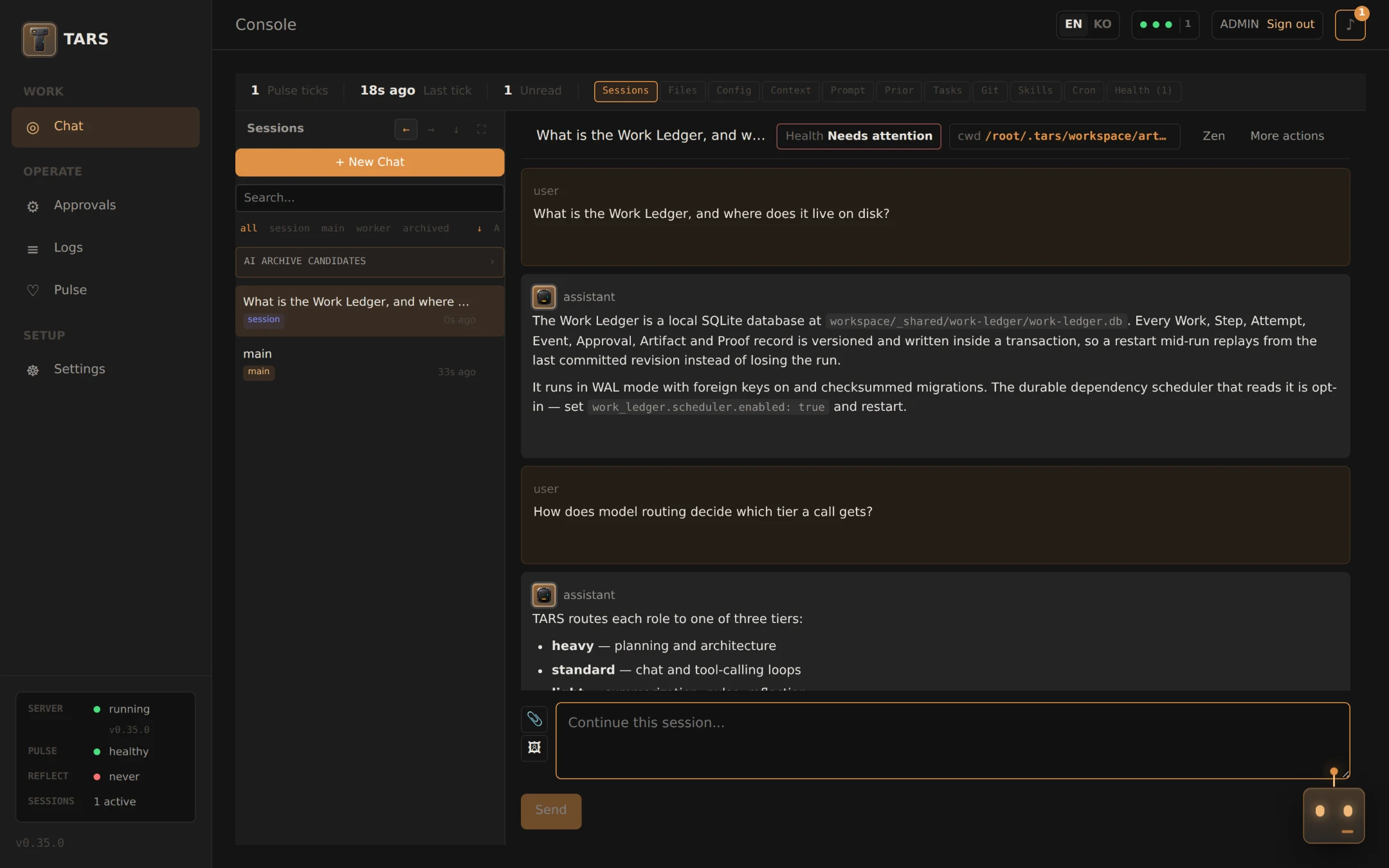
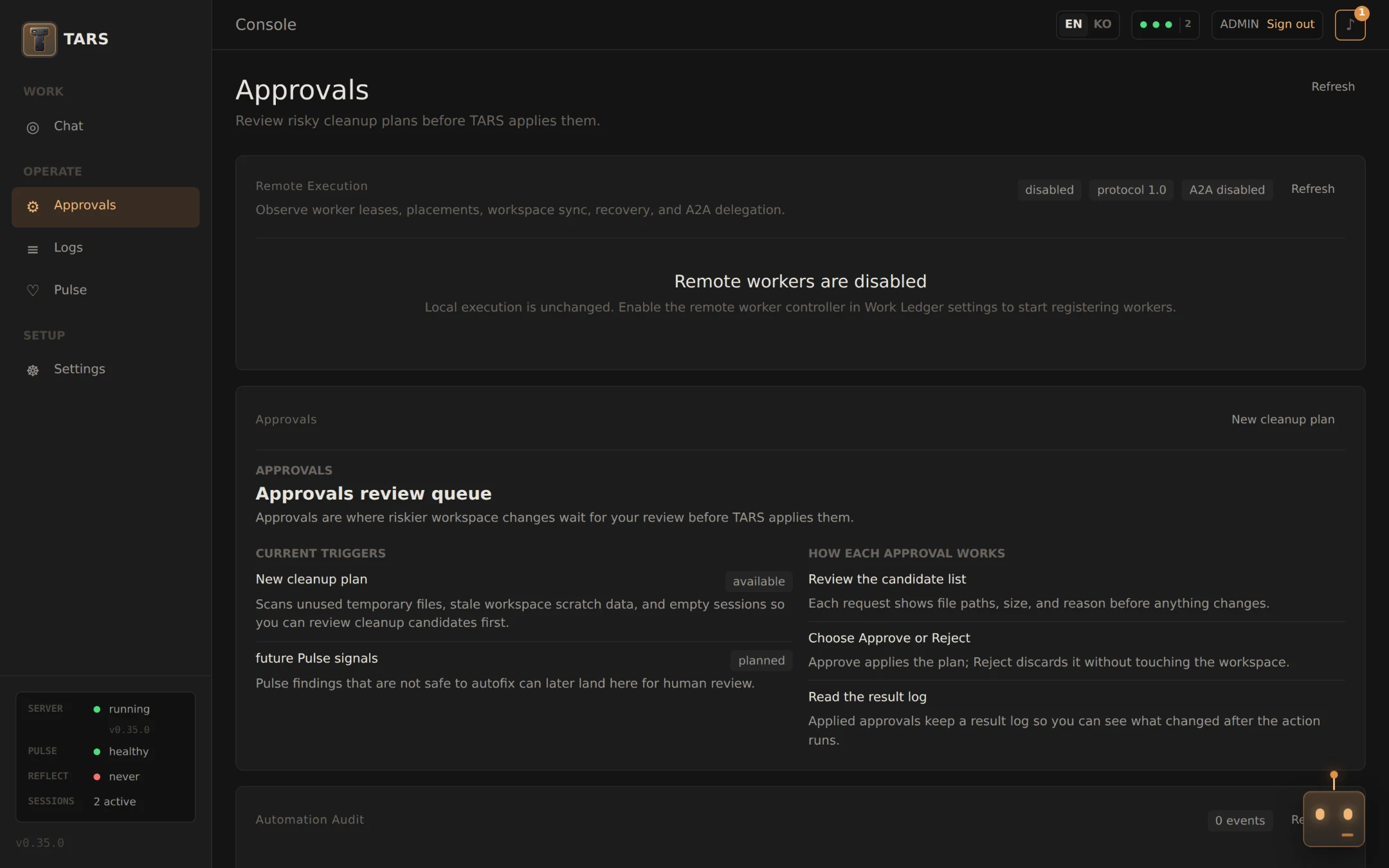
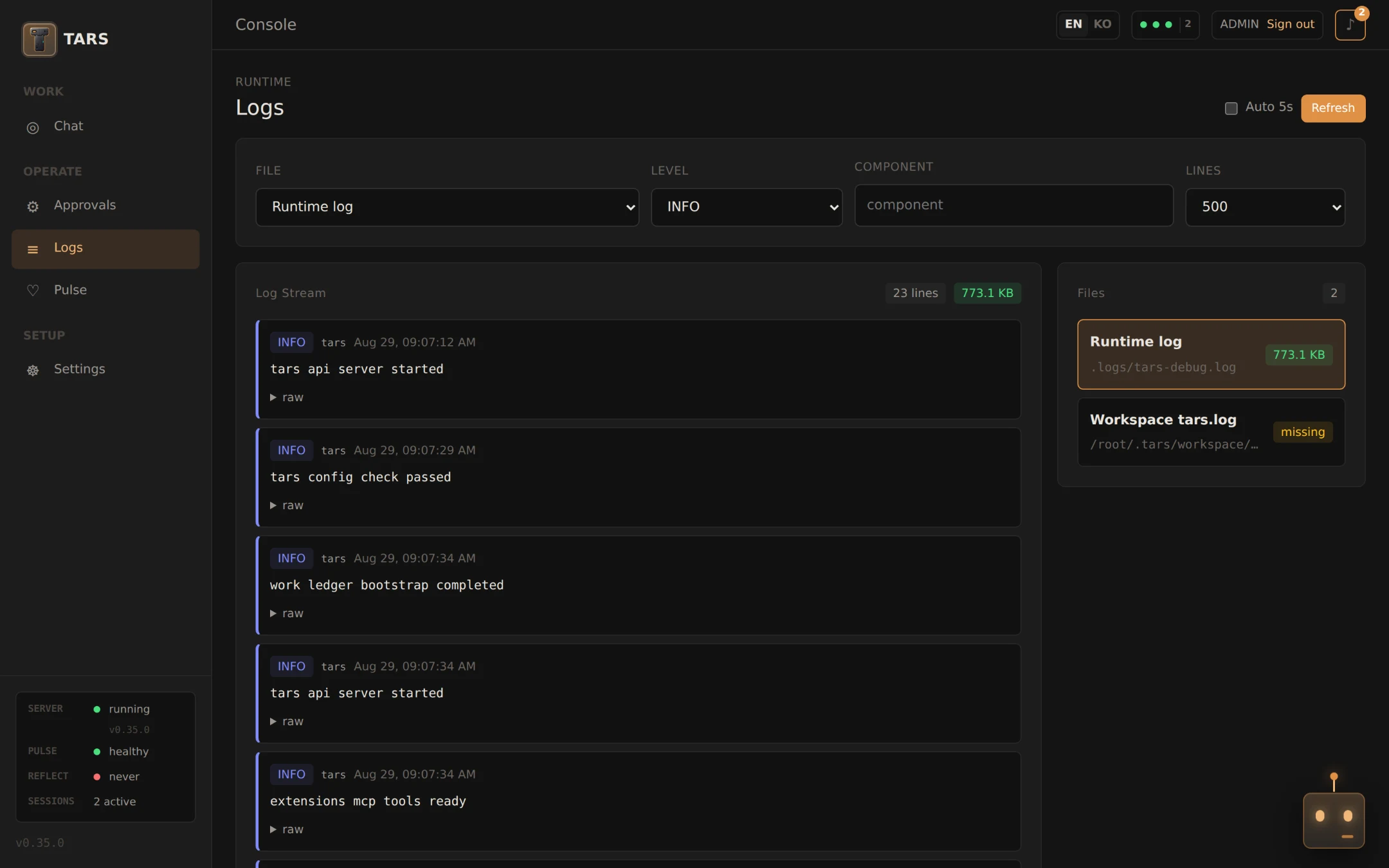
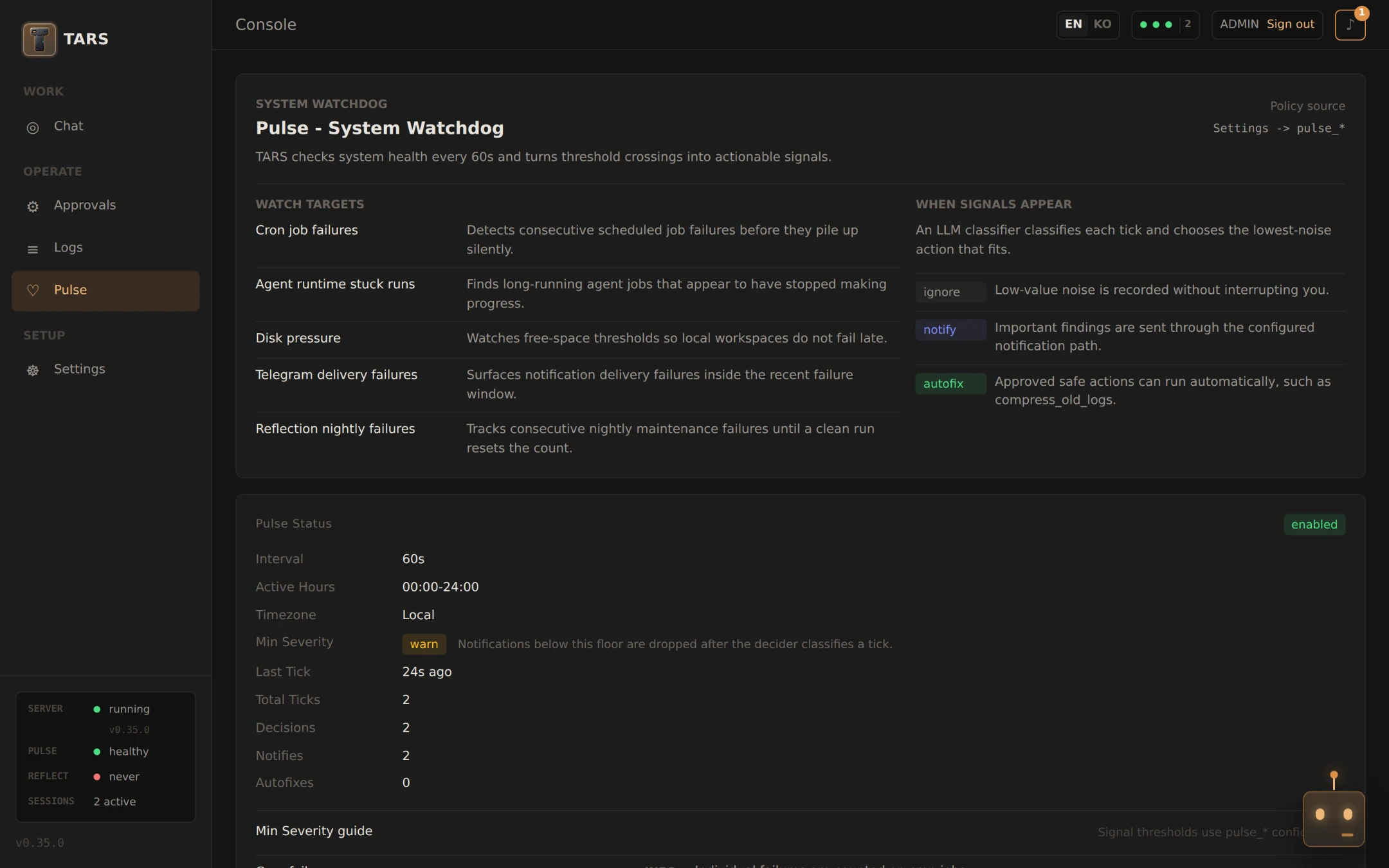
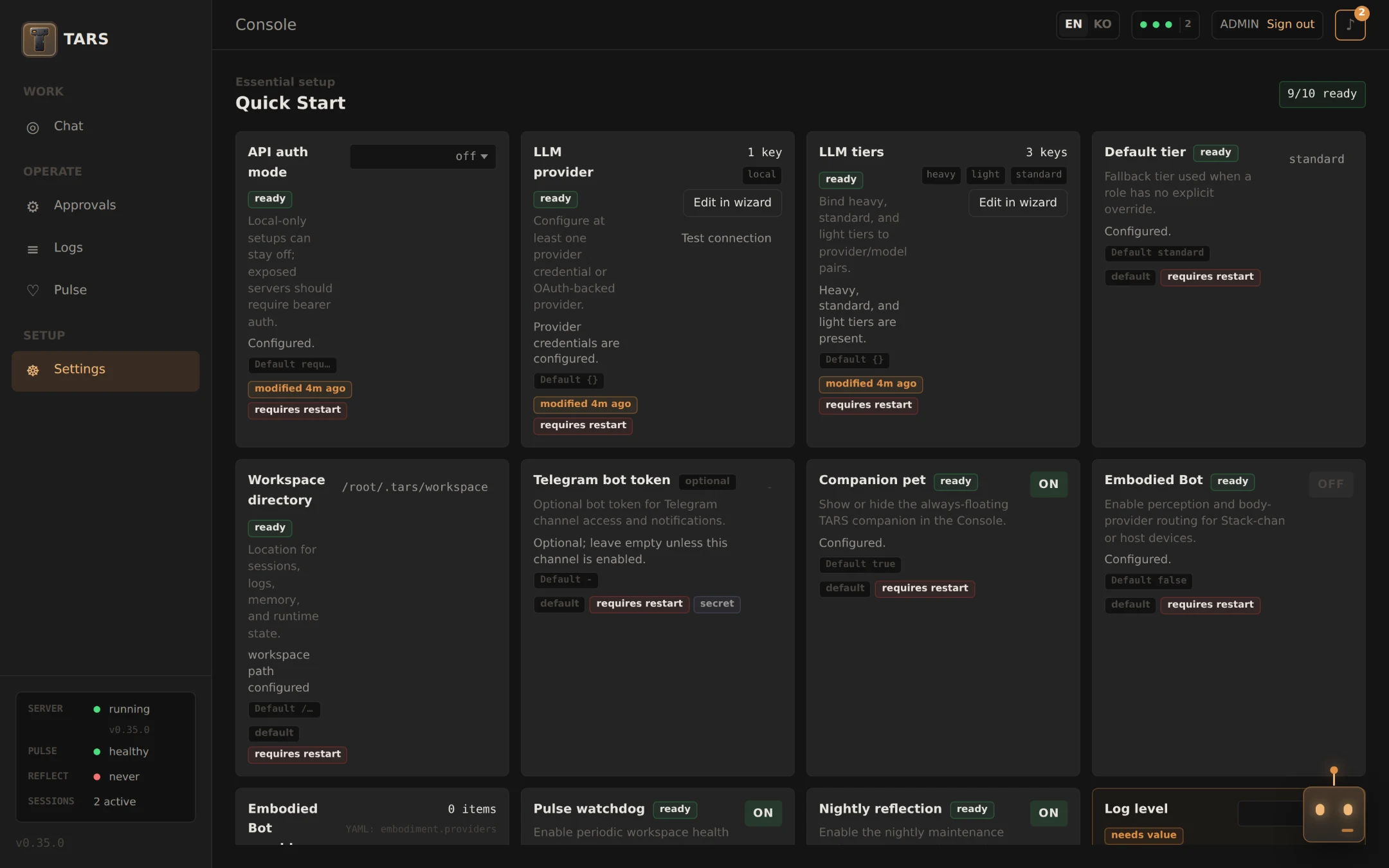
Real screens from a local install, not mockups. The workspace is a throwaway one, so the numbers are small — an everyday workspace fills these pages out.
Core stays small
The rest is opt-in
TARS doesn't push every feature into the system prompt at once. The base runtime stays small; the rest goes into skills and plugins.
Sub-Agent Orchestration
Spawn read-only sub-agents for research and planning. Per-task model tier routing, allowlist policy, depth control. Parallel and compare modes.
Durable Memory
Markdown memory with semantic search via Gemini embeddings. Daily logs, reviewed experiences, nightly Reflection — stored on disk and auditable. Review-before-store lets you decide what gets remembered.
Pulse Watchdog
A periodic loop that checks runtime health. Detects cron failures, stuck runs, disk pressure, Telegram errors. Calls a narrow LLM only when needed.
Nightly Reflection
Extracts experiences and memory candidates from sessions overnight. Cleans up empty sessions, refreshes memory candidates. Runs as deterministic Go without exposing LLM tools.
Scheduled Jobs
30-second tick scheduler. Cron expressions and @at one-time triggers. Per-job audit history with state caps.
3-Tier LLM Router
Three tiers — Heavy, Standard, Light. Roles bind to tiers; providers and models are managed in config. Pick lighter or stronger models depending on what the work needs.
Skills, Plugins, MCP
Skills are Markdown plus a runnable CLI — loaded only when invoked, so the system prompt stays small. Plugins are gated; MCP is supported as a client. Skill installs federate across tars-hub plus external MIT-compatible hubs (openclaw, hermes, Anthropic skills): every external install previews first, generates an ATTRIBUTION.md from the upstream license, and blocks source-available content.
Multi-Channel I/O
Beyond the browser console: Telegram bidirectional messaging, inbound webhooks, macOS Assistant popup, and a local API for scripts.
Where TARS draws different lines
Two strong projects already exist in this space — OpenClaw and Hermes Agent. Each has its own focus. Here are the points TARS treats as important.
| Dimension | OpenClaw | Hermes Agent | TARS |
|---|---|---|---|
| Language | TypeScript | Python | Go (single binary) |
| Primary UI | CLI | CLI + API | Browser console (CLI/Telegram/webhooks too) |
| Sub-agents | ACP + subagent runtimes, Docker sandbox | ThreadPoolExecutor (max 3), ephemeral prompt | Per-task model tier, allowlist policy, depth control |
| Model routing | Per-agent model override | Per-child override, MoA (4 frontier models) | 3-tier bundles (heavy/standard/light), role→tier mapping |
| Memory | Session transcripts | Honcho/Holographic plugin hooks | Markdown + semantic + review-before-store + nightly reflection |
| Background | — | — | Pulse watchdog (1-min) + nightly reflection batch |
| Scheduling | — | — | Session-bound cron + audit logs |
| Extensibility | Built-in tools | Toolsets | Skills + companion CLIs + gated plugins/MCP |
Verified on 2026-08-02 against TARS v0.35.0, OpenClaw v2026.7.1, and Hermes Agent v0.19.1. Treat all three columns as a snapshot of that date, not a comparison of current releases. The comparison is from the TARS perspective and intentionally simplified — read the source for each project to form your own view.
One binary,
separated tool surfaces
TARS runs as a single binary, but doesn't expose every tool the same way. The tools available in chat are kept separate from the tools used inside the runtime. The ops_, pulse_, and reflection_ families can't be called directly from regular chat — they are reserved for runtime-internal operations. Pulse uses a narrow Go interface and only calls the LLM when needed; Reflection is deterministic.
┌─ cmd/tars (cobra) ──────────────────────────────────────┐
│ serve · service · init · doctor · status · cron · ...   │
└──────────────────────────┬──────────────────────────────┘
                           │
            ┌──────────────▼──────────────┐
            │  tarsserver (127.0.0.1:43180) │
            └──┬─────────┬──────────┬──────┘
               │         │          │
       ┌───────▼──┐ ┌────▼─────┐ ┌──▼─────────┐
       │  chat    │ │  pulse   │ │ reflection │
       │  agent   │ │ watchdog │ │  nightly   │
       └────┬─────┘ └────┬─────┘ └────┬───────┘
            │            │            │
       ┌────▼────────────▼────────────▼─┐
       │   memory · cron · ops · llm    │
└────────────────────────────────┘Get started in three steps
On first run, the setup wizard walks you through LLM provider and model tier configuration. Until an LLM is configured, the console runs in setup-only mode.
Install
macOS / Linux — pre-built binary with console
brew tap devlikebear/tap
brew install devlikebear/tap/tars
Initialize workspace
tars init
Start the server
Runs in the terminal until Ctrl+C.
tars serve
# console at http://127.0.0.1:43180/console